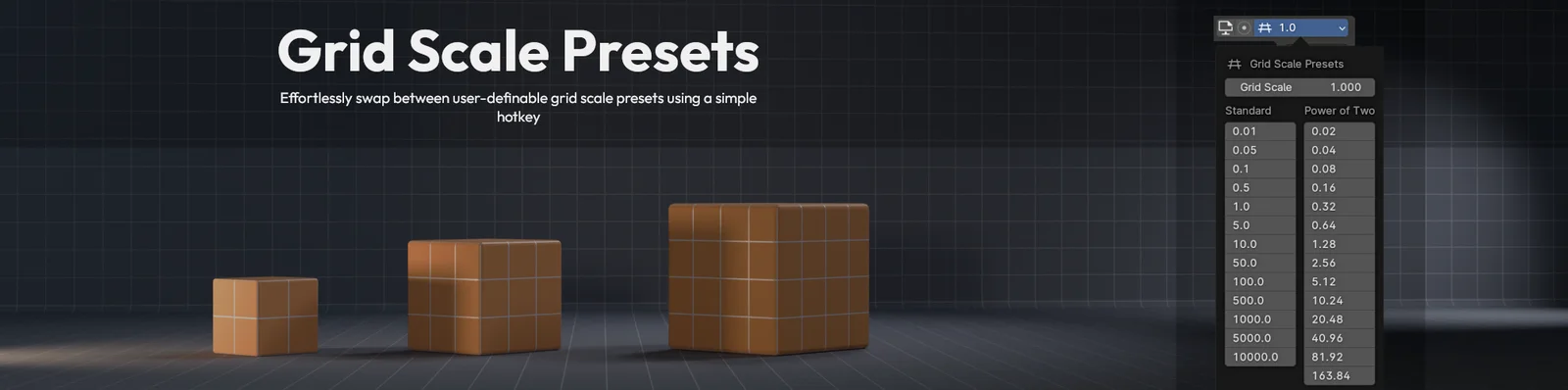
Grid Scale Presets adds tools to manage and switch between custom grid sizes in the 3D viewport. The add-on includes a header dropdown menu that displays the current scale and allows for quick manual adjustments or preset selection. Users can define their own grid scales in the preferences, categorized into standard decimal increments and power-of-two increments for precise snapping control.
Navigation between grid scales is handled through default keyboard shortcuts, with support for custom keymap binding. By default, grid scale changes apply across all workspaces, though this can be restricted using a per-workspace toggle. Add-on preferences and custom presets can be exported to an INI file for backup or external editing.
You might also like


5.0 Addon·€4.42

Addon·$8

Addon·Free

5.0 Addon·$6


Addon·Free

Addon·$5

Addon·$20


5.0 Geo Nodes·$1


4.6 Addon·€10
5.0 Addon·$5

4.9 Addon·$25

5.0 Addon·$10