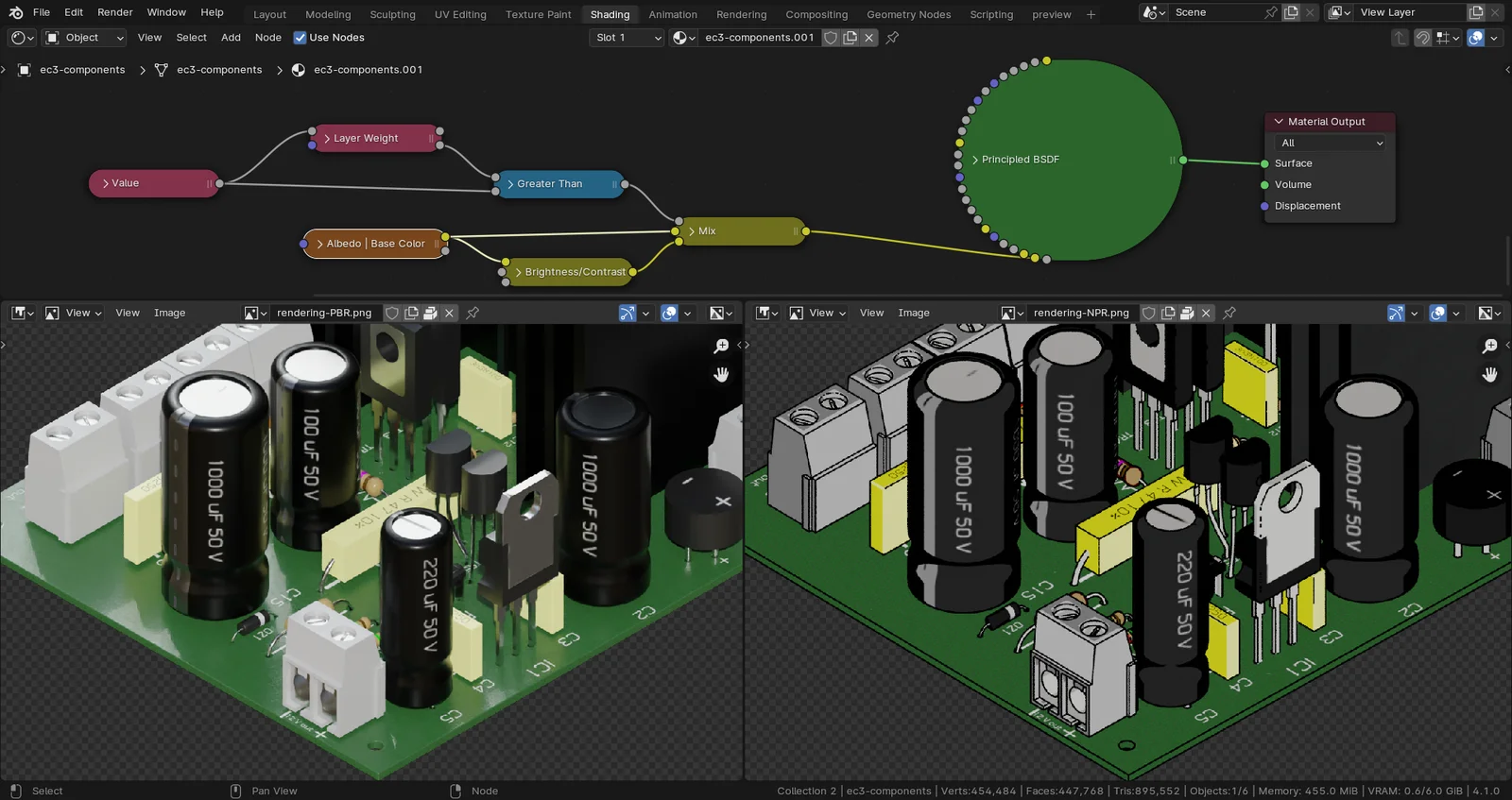
This written guide explains how to convert a standard 3D model with PBR textures into a non-photorealistic illustration. The tutorial details a specific node setup designed to replicate the visual style of vintage electronics magazine diagrams.
The workflow covers removing existing scene lighting and modifying the Principled BSDF node to rely only on the base color texture. It explains how to adjust Ray Visibility settings to eliminate color bleeding and configure Freestyle to generate object outlines during post-production. The final section demonstrates how to create camera-dependent shading based on the orientation of geometric faces to add depth to flat surfaces. The techniques are demonstrated using the Cycles render engine.
You might also like

4.7 Shader·$15

5.0 Geo Nodes·Free

Geo Nodes·€6


Shader·£4.99

5.0 Shader·Free

4.8 Shader·€8

4.9 Shader·Free

5.0 Geo Nodes·Free

4.0 Tutorial·$5

4.9 Shader·Free

5.0 Shader·$0.99

Shader·$1.99