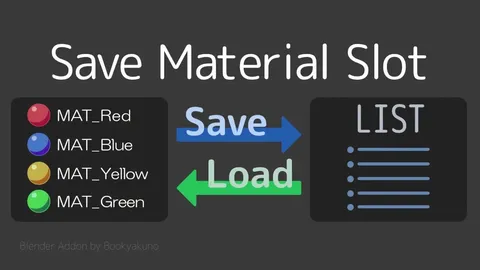
Save Material Slot provides a system for managing material assignments on objects. It allows you to save, load, and delete multiple material slot configurations, keeping them organized in a list format. Saved configurations can be edited and sorted by index, settings object, active object, or name, making it easier to switch between different material setups for rendering.
The tool integrates into several areas of the interface, including the Material properties header and the 3D Viewport sidebar. It also features a customizable popup menu accessible via a hotkey for quick access. An experimental keyframe mode is included for animating material slot changes, though this specific feature is currently noted as unstable.
You might also like

Addon·$12.95

Addon·$18

5.0 Addon·€5


5.0 Addon·$1

Addon·$5

5.0 Addon·$7.99

5.0 Addon·$10

4.9 Addon·Free

5.0 Addon·$26

4.5 Addon·$9

5.0 Addon·Free


Addon·$15