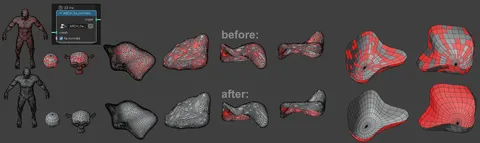
This Geometry Nodes setup demonstrates the functionality of the Set Mesh Normal node introduced in Blender 4.5. It enables users to procedurally blend the normals of one object onto another, creating smooth surface transitions without the need for manual sculpting or complex modifier stacks.
The node group exposes parameters to streamline the workflow directly in the modifier panel. Users can assign a specific target mesh using a dropdown menu and adjust the falloff and intensity of the effect using the From Max and To Max values. This allows for precise control over the distance range where the normal mixing occurs.
You might also like


5.0 Geo Nodes·Free

5.0 Geo Nodes·$5


Geo Nodes·$19.99

Geo Nodes·Free

5.0 Geo Nodes·Free
5.0 Geo Nodes·Free

5.0 Geo Nodes·$3


4.8 Addon·$15

5.0 Geo Nodes·$10

5.0 Geo Nodes·Free

5.0 Geo Nodes·$3

Geo Nodes·Free